


Business Website Development Guide: From Strategy to Launch
A practical guide to planning, designing, building, testing, and launching a business website that communicates value clearly and turns the right visitors into enquiries.

A successful business website is planned as a commercial system, not a collection of attractive pages. It should help the right visitor understand what you offer, trust your business, find the information they need, and take a useful next step. Design and development matter, but they work only when the strategy beneath them is clear.
This guide explains the complete process: defining the business goal, planning the sitemap, writing conversion-focused content, designing the experience, developing the site, testing it, and launching it responsibly. It is written for founders, marketing teams, and service businesses preparing a new website or a substantial redesign.
This is the cornerstone guide for the Website Development knowledge hub. If you are already comparing low-cost options, also read Why Cheap Websites Attract Cheap Leads before choosing a supplier on price alone.
What business website development actually includes
Business website development is broader than coding. It connects commercial strategy, information architecture, content, user experience, visual design, search visibility, technology, quality assurance, and ongoing operation.
The website-development process answers buyer-facing questions such as:
- Who must the website persuade?
- What problem does each audience need to solve?
- Which services, products, or capabilities should receive their own pages?
- What evidence will reduce hesitation?
- What should a qualified visitor do next?
- How will search engines discover and understand the content?
- Who will maintain the website after launch?
Framework selection is a different layer. Decisions about rendering, caching, application architecture, or a migration to Next.js belong in the Next.js Development knowledge hub. A strong website strategy should remain useful even if the implementation technology changes.
The website-development process at a glance
| Stage | Main question | Practical output |
|---|---|---|
| 1. Strategy | What business result must the site support? | Goals, audiences, offer, conversion priorities |
| 2. Research | What do buyers need to know and trust? | Customer questions, objections, proof inventory |
| 3. Information architecture | Which pages and journeys are required? | Sitemap, navigation, page hierarchy |
| 4. Content | What should each page communicate? | Page briefs, copy, calls to action, SEO plan |
| 5. UX and visual design | How should the experience guide attention? | Wireframes, responsive designs, design system |
| 6. Development | How will the approved experience work? | Templates, CMS, forms, integrations, analytics |
| 7. Quality assurance | Is it accurate, accessible, secure, and usable? | Test results and launch corrections |
| 8. Launch and improvement | How will the site remain useful? | Deployment, measurement, maintenance backlog |
1. Start with a business outcome
“We need a modern website” is not a sufficient goal. Modernity is subjective, and it gives the project team no reliable way to prioritise pages or features.
Choose one primary outcome and a small set of supporting outcomes. A professional-services firm may prioritise qualified consultation requests. A B2B distributor may prioritise partnership enquiries. A transport company may need visitors to request a quote or make a booking. A luxury brand may need to establish positioning before asking for an enquiry.
For each audience, document:
- The situation that brings them to the website.
- The outcome they want.
- The questions they ask before contacting a supplier.
- The risks or objections that slow the decision.
- The proof that would make the business credible.
- The most appropriate next action.
This prevents a common failure: building the site around the company’s internal structure instead of the buyer’s decision process.
2. Turn the buyer journey into a sitemap
A sitemap is a decision map, not merely a list of pages. Every important service and audience needs a clear destination, while closely related information should be grouped so visitors and crawlers can understand the relationship.
A typical service-business website may include:
- Home
- One page for each distinct service
- Industry or audience pages where the need is genuinely different
- About and team pages
- Portfolio or case studies
- A knowledge base or blog
- Contact, enquiry, or booking pages
- Privacy, cookie, and other required legal pages
Do not force every offer onto one generic services page. A dedicated service page can explain the problem, process, scope, proof, frequently asked questions, and next step without making the visitor search for context.
Keep navigation labels direct. “Website Development” communicates more than an internal brand phrase. Important pages should be reachable through ordinary links, not hidden behind filters, sliders, or JavaScript-only controls.
Information-architecture checklist
- Can a new visitor describe the business after reading the homepage hero?
- Does every major service have a logical page?
- Can users reach important content in a few sensible steps?
- Do service pages link to relevant proof and educational resources?
- Do breadcrumbs show where deeper pages belong?
- Is there one canonical destination for each subject?
3. Write content before polishing the visuals
Design cannot rescue a vague offer. Before high-fidelity design, create a brief for every priority page. The brief should define the page’s audience, search intent, main promise, supporting points, proof, objections, and call to action.
A useful service-page structure is:
- Clear promise: say what you provide and for whom.
- Problem context: show that you understand the buyer’s situation.
- Scope: explain what is included and what the engagement produces.
- Process: remove uncertainty about how the work happens.
- Proof: show relevant projects, expertise, testimonials, or credentials.
- Risk reduction: answer practical questions about timing, ownership, support, or confidentiality.
- Next step: ask for an action proportionate to the decision.
A high-consideration buyer may not be ready to “buy now.” A project brief, consultation, quote request, or relevant guide may be a better next step. Use descriptive calls to action so users know what will happen after clicking.
4. Design for trust, hierarchy, and action
Visual design should communicate the character of the business while making the information easier to use. Strong hierarchy tells the visitor what matters first. Consistent spacing, type, colour, and components make the experience feel deliberate. Responsive behaviour ensures the same logic survives on smaller screens.
Trust is contextual. Different businesses need different evidence:
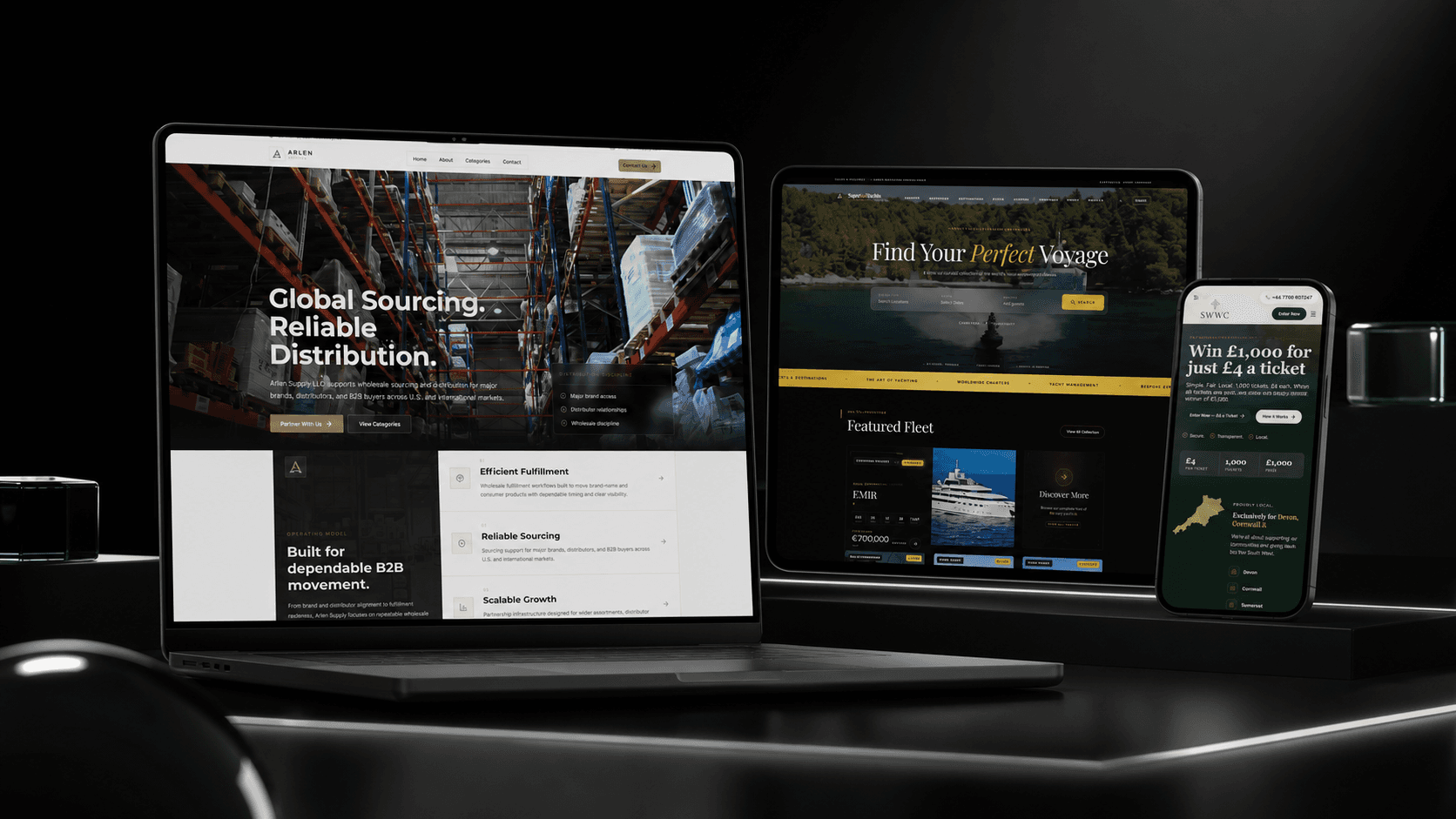
- SuperSailYachts needed a digital experience refined enough for the superyacht market. DIONIX used hero-led storytelling, curated listings, rich-media galleries, and a managed editorial platform, while keeping a clear enquiry path for high-net-worth clients.
- BHB Airport Transfers needed premium positioning and a practical booking journey. Its experience combines an instant-quote engine, interactive route map, transfer options, trust signals, custom requests, and direct booking in a responsive flow.
- The London City Law required an authority-first legal presence. Clear practice areas, senior-team profiles, and a discreet, confidentiality-aware enquiry route support trust without using aggressive sales patterns.
- Arlen Supply needed to speak to brands, distributors, and B2B buyers. Its structure explains the operating model, supplier fit, category opportunities, and a focused route into wholesale sourcing conversations.
These examples use different visual languages because the audiences, risks, and desired actions are different. Copying a fashionable layout without the same commercial context usually produces decoration rather than communication.
5. Define the build before development begins
An approved design is not a complete development specification. The team also needs to define content-management needs, form behaviour, integrations, analytics, redirects, permissions, accessibility expectations, browser support, performance requirements, and ownership after launch.
A practical scope should identify:
- Templates and unique page types.
- Reusable content sections.
- Which content editors can change safely.
- Form fields, validation, recipients, storage, and confirmation messages.
- CRM, booking, email, payment, or analytics integrations.
- Required structured data, metadata, canonicals, and sitemap behaviour.
- Redirects from existing URLs.
- Cookie consent and privacy requirements.
- Hosting, domains, backups, monitoring, and support responsibility.
If the site uses Next.js, the implementation team can then select appropriate rendering, caching, image, font, and content patterns. Those technical decisions should serve the approved website plan rather than dictate it.
Confirm ownership before the build starts
Record who will own the domain, hosting account, analytics property, search-console access, content-management account, source code, design files, image licences, and third-party subscriptions. The business should not discover after launch that an essential account belongs only to a contractor’s personal email address.
Agree how credentials will be transferred, which services carry recurring fees, and who can approve future changes. If the website collects enquiries or customer information, document where that data is stored, who can access it, and how long it is retained. Clear ownership makes maintenance, supplier changes, incident response, and future redesigns substantially easier.
6. Build in reviewable stages
A reliable development process creates checkpoints. Teams should be able to review the content model, global navigation, representative page templates, forms, integrations, and mobile behaviour before the entire website is treated as finished.
Use real content during development wherever possible. Placeholder text hides layout problems and makes it difficult to judge whether headings, proof, calls to action, and page length work together.
Feedback should describe the user or business issue. “The partnership route is difficult to find” is more actionable than “make this section pop.” Keep decisions in one agreed channel, identify who has approval authority, and separate launch-critical corrections from future enhancements.
7. Test the complete journey
Quality assurance should cover more than visual comparison with a design file. Test the experience as a visitor, editor, search crawler, and business owner.
| Area | Checks before launch |
|---|---|
| Content | Facts, spelling, contact details, pricing language, legal text, links |
| Responsive UX | Navigation, tap targets, tables, forms, images, long headings |
| Forms | Validation, spam protection, delivery, storage, confirmations, error states |
| Accessibility | Keyboard use, focus states, labels, headings, contrast, alternative text |
| Search | Titles, descriptions, canonicals, crawlable links, sitemap, robots rules, schema |
| Performance | Image sizes, fonts, scripts, loading behaviour, layout stability |
| Operations | Analytics, consent, redirects, backups, monitoring, editor access |
Test enquiries using real inboxes and realistic data. Confirm that the business can respond, not merely that the browser displays a success message.
8. Launch without treating launch as the finish line
For a redesign, record current URLs before deployment and map every replaced URL to the most relevant new destination. Preserve valuable content and links. Do not redirect everything to the homepage.
At launch:
- Verify the production domain and HTTPS behaviour.
- Confirm redirects and canonical URLs.
- Submit or verify the XML sitemap.
- Check that important pages are indexable.
- Re-test forms, bookings, payments, and analytics.
- Review the website on common screen sizes.
- Record ownership of updates, backups, and incident response.
After launch, review search queries, landing pages, enquiry quality, form completion, and user questions. Improve unclear pages based on evidence. A useful website is an operated asset, not a design file that happens to be online.
How to choose a website development partner
Ask prospective partners to explain how they connect strategy, content, design, development, search readiness, and post-launch support. Review case studies for relevance, not only visual style. Clarify who writes content, who owns accounts and source code, how scope changes are handled, and how testing is documented.
A strong partner should be able to challenge an unnecessary feature, explain a trade-off in plain language, and show how each important page supports a visitor decision.
Your next step
Before requesting proposals, prepare a one-page brief containing your audience, business goal, required services or products, current website problems, proof assets, integrations, decision-makers, and desired launch window. That brief will produce more useful conversations than a list of visual references alone.
Continue exploring practical resources in the Website Development knowledge hub, or review DIONIX’s website development service when you are ready to turn the strategy into a scoped build.
Continue Reading
View Website Development
Why Cheap Websites Attract Cheap Leads: The Premium Website Strategy for High-Value Clients
A cheap website rarely just saves money. It shapes who trusts you, what kind of leads contact you, and whether high-value clients believe your business can deliver premium work.
How Custom Software Development Works: A Buyer’s Guide
A practical buyer’s guide to custom software discovery, requirements, architecture, delivery, migration, rollout, and support—plus the decisions that prevent expensive rework.
When to Build Custom Software Instead of Buying Another SaaS Tool
Buying another SaaS subscription can feel easier than building custom software, but growing businesses eventually need systems that match their workflows, data, permissions, and customer experience.